


.png)

What's a Thermostat in an Air Conditioner?


Government Rebates Now Available on Energy-Efficient Air Conditioners when Replacing your Gas Heater.
A thermostat in an air conditioner is the control device that senses indoor temperature and tells the HVAC system when to cool or stop. It measures ambient conditions, compares that reading to your selected setpoint, and then sends commands to parts like the compressor and fan to run or pause. That action reduces wasted energy and steadies your indoor climate. In this guide, we'll break down how thermostats figure out the temperature, the bits and bobs that connect them to your air con, the differences between the old-school mechanical ones, digital, programmable, and smart models, and why upgrading can be a real winner. Lots of folks, whether they own a home or manage a building, often notice patchy temperatures, their air con turning on and off too quickly, or bills that are a bit of a shocker. Getting your head around how a thermostat works can really help you nail down what's going wrong and pick the best control for your system. We'll cover how an air con thermostat works, the main types and features, smart thermostat advantages, compatibility checks for Ozair Group systems, common troubleshooting steps, and the regular upkeep you can do yourself or get a tradie in for.
How Does an Air Con Thermostat Keep Things Cool?
An air con thermostat keeps temperature under control in three steps: sense, compare, and actuate. First, its sensor measures the room air. The thermostat’s control logic compares that value to the setpoint. If cooling is needed, it sends an actuation signal to start the compressor and fan; if not, it stops them. This closed loop process balances comfort and energy use by limiting unnecessary compressor runtime and holding temperatures within a set temperature range. Knowing this workflow makes it easier to understand how sensor placement, calibration, and wiring affect overall system performance. If your system is acting a bit funny, like turning on and off at odd times or giving dodgy temperature readings, Ozair Group reckons it's best to get a professional to check the sensor, wiring, and settings before you go replacing big parts. That way, you can be sure the thermostat is actually the problem.
What Bits and Bobs Make an Air Con Thermostat Sense and Control the Temperature?
A typical air con thermostat includes a temperature sensor, a control board, a switch or relay, a user interface, and a power source, and each has a clear job to do. Sensors can be thermistors, thermocouples, or bimetal elements; thermistors are common in modern units for their accuracy and response. The control board interprets sensor readings and enforces the setpoint using algorithms and a hysteresis setting (which is a small temperature range) to stop it from turning on and off too quickly. Relays or electronic switches close circuits to energise the compressor, condenser fan, or auxiliary heat, while the user interface shows setpoints and accepts programming. Power comes from batteries or a 24V transformer (C-wire). Typical failures include sensor drift, relay wear, or power interruptions. These are issues a technician can test and replace if needed.
How Does the Thermostat Tell the Air Con to Keep You Comfy?
Thermostats send control signals through mechanical contacts, low voltage 24V control circuits, digital relays, or wireless messages depending on the model; those signals determine which HVAC functions run. Simple mechanical thermostats close a switch when the temperature moves away from the setpoint. Most modern systems use 24V terminals labeled R, C, Y, G, and W for power, compressor call, fan control, and heat call. Smart thermostats may use internal relays or a separate bridge to communicate with the outdoor unit. Some even connect to your home network for remote control and checking things out. Proper wiring and correct terminal use are essential for safe operation, so always follow the manufacturer's instructions. If you're ever unsure, get a qualified HVAC tradie to handle any wiring changes. You don't want to muck things up or damage your system. Knowing how these signals work helps you understand why it's so important to check compatibility when you're picking a new thermostat or upgrading.
What Are the Different Types of Air Con Thermostats and What Do They Do?
Thermostats range from straightforward mechanical models to feature-rich smart devices, and each type makes different tradeoffs in cost, accuracy, and functionality. Mechanical thermostats use bimetal strips or similar elements and provide basic on/off control with limited accuracy. Digital thermostats improve sensing precision and offer clearer displays. Programmable thermostats add scheduling to cut runtime during predictable unoccupied hours. Smart thermostats layer on Wi-Fi connectivity, learning algorithms, and remote diagnostics to optimise comfort and efficiency. The right choice depends on the needs of the people living there, your budget, and the existing HVAC wiring and complexity. The quick comparison below shows you the usual connectivity, power, and programming bits to help you decide if an upgrade is right for you.
Different thermostat types compared by connectivity, power, and programming:

What's the Guts of the Difference Between Mechanical, Digital, and Programmable Thermostats?
The main differences are sensing accuracy, user control, and energy-saving potential. Mechanical thermostats are robust but can be several degrees off and offer no scheduling. They're best for really simple setups. Digital thermostats tighten temperature control and make setpoint changes easier, cutting wasted runtime. Programmable thermostats add scheduled setbacks and multiple temperature periods so homeowners can lower cooling during expected absences and really save a few bucks if you use them properly. If you want remote access or adaptive automation, smart thermostats add learning and analytics beyond what programmable units provide.
What's So Good About Smart Thermostats for Your Air Con?
Smart thermostats combine remote control, learning algorithms, occupancy sensing, and integration with smart home platforms to improve comfort and efficiency. Learning features detect usage patterns and adjust setpoints automatically. Geofencing and phone-based location services can pre-cool or allow setbacks when the home is empty. Integrations with voice assistants and automation systems enable scene-based control and quick adjustments without manual steps. Industry reports from 2023 to 2024 show typical combined heating and cooling savings in the 8 to 15% range when smart features are used effectively, though how much you save really depends on your climate, your habits, and the condition of your system. Diagnostic alerts and energy reports also help spot HVAC issues early, helping your system run smoothly for longer.
What Are the Main Benefits of Having a Smart Thermostat for Your Air Con?
Smart thermostats provide measurable benefits in energy savings, convenience, and diagnostics that together improve comfort and reduce operating costs over time. Energy savings come from adaptive scheduling, occupancy detection, and weather-aware adjustments that trim unnecessary compressor runtime while keeping occupants comfortable. Convenience features like remote control, voice commands, and automatic routines make daily interaction simple and ensure spaces are conditioned when needed. Diagnostic alerts and usage reports highlight abnormal patterns that often point to maintenance needs, enabling faster fixes and potentially making your gear last longer. The table below maps common smart features to how they work and the value they deliver.
Smart thermostat features mapped to mechanism and value:
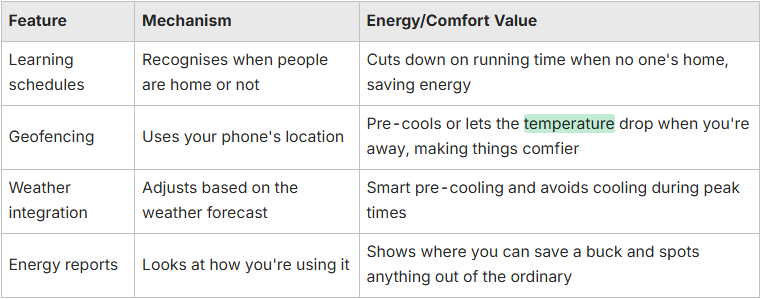
How Do Smart Thermostats Help You Save Energy and Cut Down on Bills?
Smart thermostats cut energy use by combining scheduling, occupancy sensing, weather data, and adaptive control to reduce unnecessary compressor runtime without sacrificing comfort. For example, learning schedules lower cooling when the home is unoccupied and restore comfort before people return, reducing wasted runtime. Weather-aware algorithms can precondition spaces when conditions allow, easing peak compressor strain and potentially shifting runtime away from peak hours. Energy reports create feedback that encourages small changes in how you use it, like tweaking the temperature a little, which really add up over time. While averages point to 8 to 15% savings, how much you actually save depends on your usual habits, where your thermostat is, and the condition of your system.
How Do Smart Thermostats Make Life More Comfy and Convenient?
Smart thermostats enhance comfort and convenience through remote pre-cooling, room-by-room scheduling when paired with sensors, voice control, and routines that adapt without manual input. Remote access lets you set the home to a comfortable temperature before you arrive or enable setbacks during unexpected absences. With multi-sensor setups or zoning, smart controls help balance temperatures and reduce hot or cold spots. Voice and automation integrations simplify tasks, such as activating “sleep” or “away” modes, so everyone enjoys consistent comfort without lifting a finger. These conveniences often increase perceived value and make energy-saving behaviors easier to maintain.
How to Pick the Right Thermostat for Your Ozair Group Air Con?
Picking the right thermostat for an Ozair Group system means checking control voltage, stage count, heat pump details, and wiring availability to confirm compatibility and reliable control. Start by identifying whether your system is single-stage, multi-stage, or a heat pump, and confirm whether a 24V control circuit or line-voltage control is present; many smart units require a C-wire. Consider needed features such as staging support, humidity control, sensor compatibility, and remote diagnostics. These bits and bobs determine whether a simple digital or a full-featured smart thermostat fits best. Ozair Group reckons it's a good idea to chat with an HVAC professional if you've got a multi-stage system, a heat pump, or if you need to muck around with the wiring to get steady power to your thermostat. A professional check-up cuts down on installation risks and makes sure your thermostat can properly control your system. Use the checklist below to guide your selection.
- Check system type and stage count to confirm controller support.
- Verify wiring and C-wire presence before purchasing a smart unit.
- Confirm the thermostat supports heat pump modes and auxiliary heat if required.
- Decide whether multi-sensor support or humidity control is necessary.
- Plan for professional installation for complex or multi-stage systems.
What Should You Look Out For When Picking a Thermostat to Make Sure It's Compatible?
Key compatibility factors include control voltage (24V versus line voltage), system architecture (single-stage, multi-stage, or heat pump), presence of a C-wire for power, and support for accessories like humidifiers or zoning panels. Confirm the number of compressor and heat stages because thermostats must match those stages or offer virtual staging to avoid incomplete control. Many smart thermostats require a steady power source, usually a C-wire or a power adapter, to avoid frequent battery use, and some manufacturers require a proprietary bridge to communicate with outdoor units. For a safe install and to guarantee it's all compatible, Ozair Group suggests getting a technician to confirm your wiring labels and system type before you upgrade to a smart control.
What Features Are Absolutely Essential for Your Thermostat to Work a Treat?
Essential features include accurate temperature sensing, reliable power (a wired C-wire is preferred), and basic scheduling. Recommended features extend this with multi-sensor support, remote diagnostics, and reliable firmware updates. Nice-to-have options include geofencing, voice control, and advanced learning that reduces user input. Professional features, like staging control and humidity management, are key for some systems. Prioritising essentials, recommended, and nice-to-have features helps balance budget with expected performance. Choosing a thermostat with modular or scalable options can future-proof your control while keeping initial costs reasonable.
What Are the Usual Air Con Thermostat Headaches and How Can You Sort Them Out?
Common thermostat issues include unresponsiveness, inaccurate temperature readings, short cycling, and connectivity failures with smart units. Each typically traces to a few likely causes that you can test systematically. Start with power checks, like battery level and 24V supply. Then, have a look at the wiring, verify sensors, and check software/firmware for smart devices. Many problems are solved by replacing batteries, tightening terminal screws, recalibrating sensors, or restoring Wi-Fi. Persistent faults often point to relay wear or failed sensors that require component replacement. The troubleshooting table below gives you a quick rundown of common problems, what's likely causing them, and steps to help you fix them safely and practically.
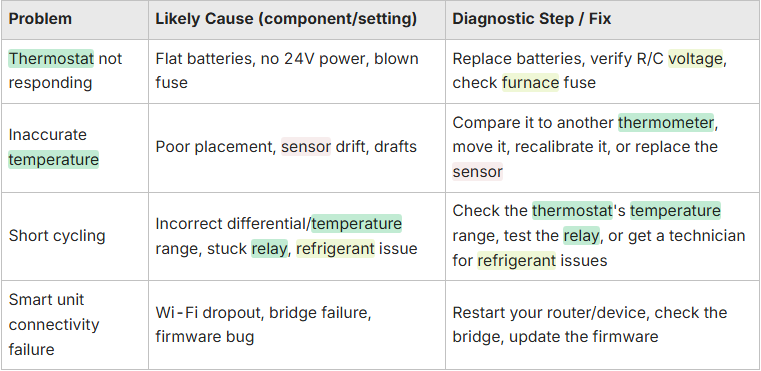
Why Might Your Thermostat Not Be Responding and How Can You Fix It?
A thermostat may stop responding because of power issues. Flat batteries, missing C-wire power, or a blown fuse are common, and fixing those usually restores service. Start by replacing batteries if present, then measure 24V between R and C terminals or have a technician verify transformer output. Inspect wiring at the thermostat for loose or corroded terminals and confirm the device’s configuration matches the system type. For smart thermostats, also check Wi-Fi credentials, bridge connections, and firmware status. If these basic steps don't sort out the problem, get in touch with a qualified HVAC tradie to test the relays and control circuits. You don't want to risk damaging your compressor or control board.
How to Deal with Dodgy Temperature Readings from Your Thermostat?
Inaccurate readings usually come from poor placement, nearby heat sources, drafts, or sensor drift. Fixing the placement and calibrating against a reference thermometer often cures the issue. Install the thermostat on an interior wall away from direct sunlight, registers, appliances, and exterior doors. Correct any mounting that exposes the sensor to radiant heat. Run a calibration check by comparing the thermostat display to a trusted thermometer at the same height and adjust or recalibrate per the manufacturer if the difference exceeds acceptable tolerance. If it's still giving you dodgy readings, replace the sensor or the whole thermostat. Sensor drift and internal wear can really mess with long-term accuracy.
How Can You Look After Your Air Con Thermostat for the Long Haul?
Regular thermostat maintenance keeps sensing accurate and control reliable. Simple seasonal tasks can prevent many common problems before they affect comfort or efficiency. Dust the thermostat interior with power off to remove debris that interferes with sensors and switches, replace batteries annually or when prompted, and apply firmware updates on smart models to receive improvements and security patches. Also schedule annual HVAC system checks so the thermostat’s readings match actual system performance. Dirty filters, low refrigerant, or blower issues can skew thermostat behavior and hide underlying problems. The maintenance checklist below blends homeowner tasks with recommended professional services to sustain long-term thermostat efficiency.
- Clean the thermostat face and interior gently with power off every 6 to 12 months.
- Replace batteries annually or as indicated by device alerts.
- Install firmware updates on smart thermostats when available.
- Have an HVAC technician perform annual system checks to verify airflow, refrigerant charge, and control electronics.
- Recalibrate or replace sensors if repeated temperature drift is detected.
What Cleaning and Calibration Tricks Keep Your Thermostat Spot On?
Cleaning and calibration protect sensor accuracy and device life by removing dust and verifying readings against a known standard. Both are simple and safe when power is off. To clean, power down the thermostat, remove the faceplate per the instructions, and gently brush away dust with a soft brush or compressed air. Avoid touching sensor elements directly. For calibration, place a reliable thermometer nearby at the same height, compare readings, and adjust the thermostat per the manufacturer if the difference exceeds tolerance. For smart thermostats, install firmware updates that improve sensing algorithms, and consult a technician for professional calibration if uncertainty remains.
Why Are Regular System Checks a Big Deal for How Your Thermostat Performs?
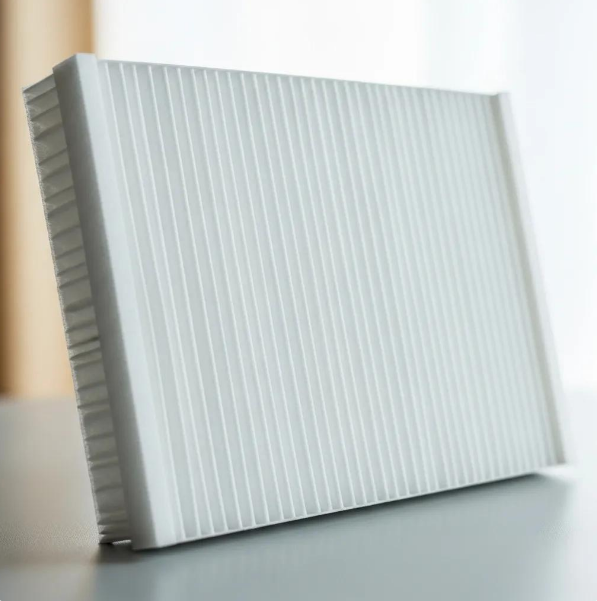
Regular system checks matter because thermostat performance depends on overall HVAC health. Airflow, refrigerant charge, and blower operation all affect how the thermostat senses and controls temperature. A dirty air filter or restricted ducts change temperature gradients and can cause longer runtimes or inaccurate cycling, which can trick the thermostat's algorithms. Incorrect refrigerant charge or a failing compressor alters cycle duration and frequency, which you might think is a thermostat problem, but it's actually a mechanical one. Annual integrated checks by a technician catch these issues early so the thermostat’s control decisions stay effective and small faults don't slowly chew away at your comfort or efficiency.

Areas we service
Oz Air covers Melbourne and its northern suburbs.

Get in touch



.png)